Ability to Browse & Self Enroll for Courses
The learner can browse the library and enroll in their desired courses. They can access the available self-paced courses (assigned to their group/sub-groups/learning groups) by clicking the ‘Courses’ option under the Browse tab. They can either scroll through or use the search option to find the desired courses.

- The learner can easily filter the courses based on the category, level, or topics.
- The learner can view the Course name, Course level, Category, and the number of learners enrolled.
- You can also display the courses based on the sort criteria.
- Clicking on a course allows them to browse the course contents for a quick overview.
Self enrolling of courses
- Click on the three dots on the course card and select the ‘Self Enroll’ option to self-enroll for that course.
- A confirmation message will appear for successful enrollment of the course.

- To unenroll from the course you already enrolled in, click on the ‘Unenroll’ option.
- If the course were assigned to the learner by his mentor or Group admin, the learner would not have the option to unenroll from the course, and the enrollment can be managed by the user who has enrolled in the course for the learner.

Copying the course URL

- To copy the course URL, click on the three dots in the Action column and select the Copy link option to copy the course URL.
Note: When the user opens the course URL, he/she will be redirected to the respective course in Skill Lake, provided he has already logged in to Skill Lake.
Accessing Udemy Courses
When Udemy integration is enabled in SkillLake, you can browse, filter, and enroll in Udemy courses along with your SkillLake content.
Prerequisites
Before accessing Udemy courses, ensure that:
- Udemy integration must be enabled in Administration > Settings > Integrations.
- Single Sign-On (SSO) must be configured between SkillLake and Udemy for automatic authentication.
Browse Udemy courses
You can switch between Skill Lake courses and Udemy courses. Udemy course cards display the course level, learner count, badges, tags, and learning credits. Click Udemy to view the available Udemy courses.
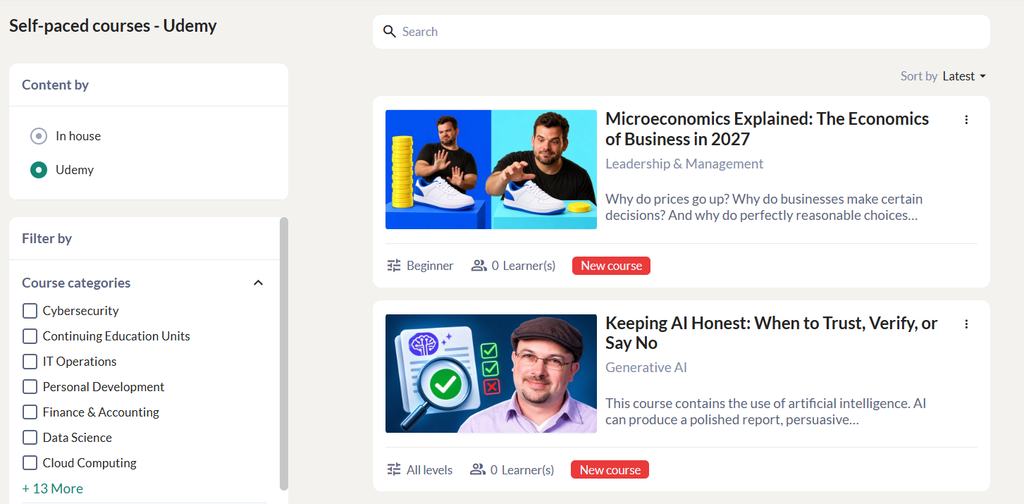
Enroll in a Udemy course
- Click the Udemy course card from the list. SkillLake redirects you to the course details page in Udemy.
- Click Enroll Now.
- If you are not already logged in to Udemy, SkillLake automatically authenticates your session using Single Sign-On (SSO) and opens the course.