Your team’s ability to navigate difficult workplace conversations determines your bottom line in today’s high-stakes corporate landscape. Manual “click-through” slides no longer cut it when it comes to handling a tough client or a sensitive HR conflict. This proves why LMS platforms with AI role play have become the gold standard for corporate training in 2026.
AI simulation training allows employees to practice soft skills in a guided and simulated environment, without the fear of real-world risks such as losing a client. Instant feedback and tailored guidance along with immersive and scalable practice provided by the AI-powered LMS help employees in building confidence and mastery.
In this guide, we break down the top 10 LMS with AI role play for corporate training. By exploring their key features, immersion levels, and pricing, you can easily choose the right AI role play training platform for your workforce.
Top 10 Corporate Training LMS with AI Role Play
- Skill Lake LMS
-
360Learning
-
Docebo
-
Absorb LMS
-
Cornerstone
-
MapleLMS
-
Disprz
-
CYPHER Learning
-
Adobe Learning Manager
-
LearnUpon
Note: Pricing and features based on data as of May 2026.
1. Skill Lake LMS
Skill Lake is an AI-powered corporate training LMS designed to meet the fast-evolving upskilling requirements of modern corporate companies. Organizations with diverse departments and remote and hybrid teams can use Skill Lake to ensure high-performance standards and drive business growth and organizational agility.
If you’ve ever struggled to manage professional certifications across various departments and global offices using spreadsheets or fragmented tools, you already understand the inefficiency. Skill Lake eliminates that complexity end-to-end. By bringing structure, automation, personalized learning paths, and intelligence into every layer of employee development, Skill Lake is widely regarded as the best LMS with AI role play for corporate training.
Key AI Features of Skill Lake LMS:
-
- AI Role Play Simulation: The ability to deliver real-world scenario training in a supervised environment leveraging interactive simulations and real-time feedback. This boosts employee communication and confidence for high-stakes professional interactions.
- AI Course Generator: Allows L&D teams to create and launch eLearning courses in minutes using AI. This facilitates employee training automation, driving speed-to-productivity.
- AI Question Generator: Simplifies the process of creating tests and assessments as part of course delivery. The AI can automatically generate questions based on the course content.
- AI/ML-Powered Course Recommendations: As a role-based learning platform, Skill Lake employs AI to personalize learning paths and tailor course recommendations for every learner.
- AI Copilot: The copilot allows L&D admins to easily refine and align course materials with business goals. It also engages learners effectively by instantly answering their questions.
Top-Notch Features of Skill Lake LMS:
- AI roleplay for practice-based learning
- AI course and questionnaire generator
- Multiple learning modes
- Mobile e-learning
- Real-time competency mapping
- SCORM Compliance
- Interactive feed and learning bytes
- Gamification & AR/VR experience
- Multi-language support
Best Use Case: Skill Lake enables cross-industry organizations to automate employee training, enhance skills, and accelerate learning efficiency. This corporate training LMS handles employee onboarding, compliance training, and partner enablement via mobile-first delivery. It provides the flexibility required to support diverse teams, specific roles, and varying operational demands.
Why It Stands Out: Skill Lake distinguishes itself as an LMS with AI role play and immersive AR/VR tech. It’s a versatile role-based learning platform that helps in mapping workforce competencies and creating custom learning paths aligned to specific business goals. Skill Lake is a great choice for corporate learning management as it plugs right into your current enterprise tools.
Related Reading: Is your organization in the industrial sector? Discover the Top 10 Best LMS for the Manufacturing Industry in 2026.
Pricing: Scalable per-user pricing model. Contact the sales team for a custom quote.
2. 360Learning
360Learning is an AI-powered LMS designed to support collaborative learning at scale. For companies needing to scale peer-to-peer knowledge sharing and soft skills, this collaborative AI layer makes a real difference.
The platform uses AI-powered video coaching and role-play to turn subject matter experts into instructors. If you’re managing a rapidly growing workforce where tribal knowledge is trapped in silos, it’s hard to find a more engaging platform.
- Key Features:
- AI-powered video coaching and role-play
- Collaborative authoring tool for internal experts
- Upvoting and feedback loops for course relevance
- Skills-based dashboards and competency tracking
- Deep integrations with Microsoft Teams, Slack, and Salesforce
- Automated compliance and certification workflows
Best Use Case: Fast-moving mid-market and corporate companies that prioritize peer-to-peer learning, sales enablement, and decentralized content creation.
Why It Stands Out: 360Learning breaks the top-down mold. One global client shared that before 360Learning, their L&D team was a bottleneck for all content. After switching, they empowered over 300 internal experts to create and update training in real-time, drastically reducing the time-to-market for new employee skills.
Pricing: Three tiers: Team (monthly pricing per user), Business (Custom), and Enterprise (Custom). Pricing for larger plans available on request.
3. Docebo
Docebo is a sophisticated AI-powered training platform that enables global corporate firms to design and scale high-performance training across diverse departments and territories.
The LMS uses interactive AI simulations and automated feedback to refine employee communication and technical skills. For organizations managing complex hierarchies, this automated coaching at scale makes a real difference.
- Key Features:
- AI-powered virtual coaching and role-play
- Automated skills tagging and content curation
- Mobile-responsive offline learning capabilities
- Enterprise-grade security and SOC2 compliance
- Robust ecosystem with 400+ third-party integrations
- Predictive analytics for learner performance trends
Best Use Case: Large-scale global organizations with complex internal structures, multi-language requirements, and a need for data-backed skill development.
Why It Stands Out: Docebo maximizes operational agility by transforming static and passive training into active and dynamic skill development. Its AI Virtual Coach provides instant, personalized guidance to thousands of employees, ensuring consistent messaging and reducing manual intervention from L&D managers.
Pricing: Custom enterprise pricing based on active user volume. Specific quotes for the full AI suite are available on request.
4. Absorb LMS
Absorb LMS is an employee training automation specialist that eliminates the administrative burden of managing complex training schedules for a large corporate workforce.
The platform uses AI-driven mapping to guide learners through realistic scenarios and pinpoint specific answers within long-form content. Its precision-based AI allows companies to improve employee performance in a controlled, professional environment.
Key Features:
- AI-guided interactive coaching and simulations
- Smart content discovery using natural language processing
- Automated learner enrollment and reporting triggers
- Built-in e-commerce for external partner training
- Extensive API library for seamless enterprise connectivity
- Mobile app with full offline synchronization
Best Use Case: Growing organizations and large corporate organizations that need to automate administrative workflows while providing a modern, intuitive interface for employees.
Why It Stands Out: Absorb LMS excels at making sophisticated technology feel approachable and easy-to-handle so L&D leaders can focus on strategic growth rather than spreadsheet management.
Pricing: Custom quotes based on user count and feature requirements.
5. Cornerstone
Cornerstone is an AI-driven LMS focused on corporate training and skills transformation. The platform utilizes its “Cornerstone Galaxy” AI to design interactive training simulations that match role-play performance against specific competency maps.
The platform’s AI identifies whether a learner struggled during a simulation and then automatically recommends targeted micro-learning content to bridge the gap.
Key Features:
- AI-powered talent marketplace and role-play simulations
- Predictive skill gap analysis and automated mapping
- Integrated performance management and learning workflows
- Specialized compliance tracking for regulated industries
- Vast content ecosystem with curated third-party libraries
- Holistic data visualization and workforce analytics
Best Use Case: Large global enterprises and complex corporate organizations that require a unified system to manage learning, performance, and long-term succession planning.
Why It Stands Out: Cornerstone excels at turning massive amounts of workforce data into actionable insights so business leaders can build a future-ready team rather than just managing basic compliance.
Pricing: Enterprise-level pricing plans tailored to organization size and module selection.
6. MapleLMS
MapleLMS is a leading AI-driven enterprise learning platform that allows businesses to automate and simplify complex corporate training. The LMS lets corporate L&D teams create interactive courses in minutes, including quizzes and assessments.
Using its intelligent AI Tutor and private AI ecosystem, MapleLMS delivers personalized learning paths and real-world scenario coaching, enabling employees to master new skills quickly. Its robust AI engine helps organizations maintain high-performance standards while significantly reducing the manual workload for L&D administrators.
Key Features:
- AI tutor for providing real-time personalized guidance
- AI-generated assessments to simplify skill evaluation
- Predictive analytics to track progress and forecast learner outcomes
- AI-driven smart auto-grading for bias-free performance reviews
- Fully-branded mobile LMS app for offline training and micro-learning
- Integration with the Salesforce® ecosystem (focus on employee training)
Best Use Case: Large-scale enterprises and member-based organizations that require a highly customizable, secure environment to manage global onboarding, compliance, and employee development.
Why It Stands Out: While MapleLMS offers adaptive learning pathways (that evolve with each employee) and AI-powered remote proctoring tools, its secure “Private AI” ecosystem ensures the security of your corporate data.
Pricing: Pricing plans and detailed quotes are available on request. Supports trial versions.
7. Disprz
Disprz is a leading AI-powered corporate learning platform that harnesses specialized intelligence to bridge the gap between theoretical knowledge and on-the-job performance for distributed workforces.
The platform utilizes its “Disprz AI” engine to power gamified learning and interactive AI simulation training that mimic real-world business challenges. Its skill-centric framework allows organizations to deploy AI role play for soft skills assessment and targeted coaching, ensuring frontline teams reach peak proficiency faster.
Key Features:
- AI-powered role-play for sales and service excellence
- Automated competency mapping and skills discovery
- Mobile-first micro-learning for frontline employees
- Personalized learning journeys driven by AI insights
- Advanced analytics to measure skill-readiness
- Social learning and peer-to-peer knowledge sharing
Best Use Case: Fast-paced industries like retail, BFSI, and logistics that need to rapidly upskill frontline workers and align their daily performance with corporate goals.
Why It Stands Out: Disprz excels at making skill development “bite-sized” and actionable so operational leaders can drive tangible productivity gains rather than just tracking course completions.
Pricing: Custom and scalable pricing tiers based on the number of active users and specific AI modules.
8. CYPHER Learning
CYPHER Learning is an agentic AI learning platform built to accelerate competency for modern corporate workforces. The platform offers real-time AI coaching and role-play, converting training from passive consumption to active participation.
Its intelligent assistant allows businesses to deploy tailored conversational simulations and automated skill assessments.
Key Features:
- AI-powered “Practice” mode for interactive role-play
- Automated course creation with AI 360 content generation
- Real-time conversational coaching and instant feedback
- AI-managed skills mapping and competency gap analysis
- Adaptive learning paths tailored to individual performance
- AI Crosscheck to ensure content accuracy and prevent bias
Best Use Case: Innovative enterprises and L&D teams that want to slash course development time while providing high-touch, AI-driven practice for corporate learning, leadership training, customer education, and partner enablement.
Why It Stands Out: CYPHER Learning excels at making “agentic” AI accessible so organizations can create personalized, gamified training in minutes rather than months, significantly reducing the cost of high-quality content development.
Pricing: Scalable pricing models available for businesses and enterprises. Custom quotes based on specific AI agent requirements are available on request.
9. Adobe Learning Manager
Adobe Learning Manager is a hyper-personalized AI role play training platform that customizes learning for every audience with adaptive experiences. Its powerful automations and workflows enable corporate L&D admins to simplify routine tasks and scale training faster.
The platform allows L&D admins to configure AI personas tailored to specific industries, enabling employees to engage in dynamic conversations and practice critical soft skills in a guided virtual setting without facing any real-world risks.
Key Features:
- AI-powered dynamic role-plays and tailored personas
- Generative AI Assistant for real-time learner guidance
- Semantic search that understands intent and context
- Automated skill-mapping based on 50M+ data points
- Headless LMS capabilities for on-brand integration
- Deep analytics integrated with Adobe Experience Cloud
Best Use Case: Global enterprises and customer-facing organizations that need to deliver high-quality, branded training while leveraging data to close complex skill gaps.
Why It Stands Out: Adobe Learning Manager makes learning “frictionless” by helping employees find exactly what they need within their flow of work. This improves engagement and long-term knowledge retention.
Pricing: Per-learner pricing model designed for mid-to-large enterprises with custom quotes and trials provided on request.
10. LearnUpon
LearnUpon is a pragmatic choice for companies training multiple audiences (employees, partners, and customers). Its AI-powered coaching assistants provide “after-action reviews” for every simulation, giving the learner a detailed breakdown of what they said well and where they missed the mark.
The AI-powered LMS is a high-growth scaling expert that combines enterprise-grade power with a user-centric design to accelerate training delivery for diverse corporate audiences.
Key Features:
- AI-assisted coaching and automated knowledge checks
- Multi-portal architecture for distinct training audiences
- Automated enrollment workflows based on user attributes
- Built-in webinar integrations for hybrid learning
- Real-time reporting dashboards and performance tracking
- Seamless API connections with CRM and HR software
Best Use Case: Fast-scaling companies and mid-to-large enterprises that need to manage multiple training streams for employees, customers, and partners simultaneously.
Why It Stands Out: LearnUpon excels at removing the complexity from multi-audience training so L&D managers can focus on delivering high-impact learning experiences rather than troubleshooting platform settings.
Pricing: Three main tiers—Essential, Premium, and Enterprise—tailored to user volume.
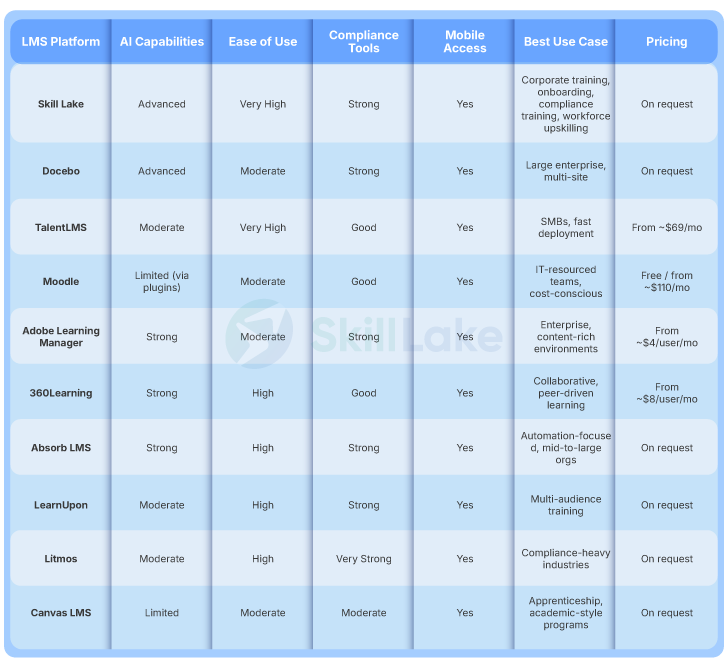
Comparison of Top 10 LMS with AI Role Play for Corporate Training
| LMS Platform | AI Capabilities | Mobile Access | Best Use Case |
|---|---|---|---|
| Skill Lake | AI Role Play Simulations, Course Generation, Copilot, Learning Personalization | Native App + Web Responsive | Cross-Industry Scaling, Global Upskilling, Integrations |
| 360Learning | Video Coaching & Peer Role Play | App + Web | Collaborative Learning & Peer Knowledge Sharing |
| Docebo | Virtual Coach & Skill Tagging | Offline App | Global Enterprise Learning Programs |
| Absorb LMS | NLP Assist & AI Scenarios | Sync App | Administrative Automation & Compliance Training |
| Cornerstone | Gap Analysis & Skills Transformation AI | Full App | Succession Planning & Talent Management |
| MapleLMS | 24/7 AI Learning Assistants, AI-Generated Quizzes | Web + Mobile App | Corporate Training & Member-Based Organizations |
| Disprz | Simulations & Gamified Learning for Frontline Training | Mobile-First | Retail Operations & Distributed Teams |
| CYPHER Learning | Agentic AI & 360° Content Generation | Responsive | Rapid Course Development & Content Creation |
| Adobe Learning Manager | Industry Personas & Semantic Learning Recommendations | Integrated | Enterprise Branded Learning Experiences |
| LearnUpon | Review-Based AI Coaching | Native App | Multi-Audience Training Portals |
Why Corporate Training Needs an LMS with AI Role Play
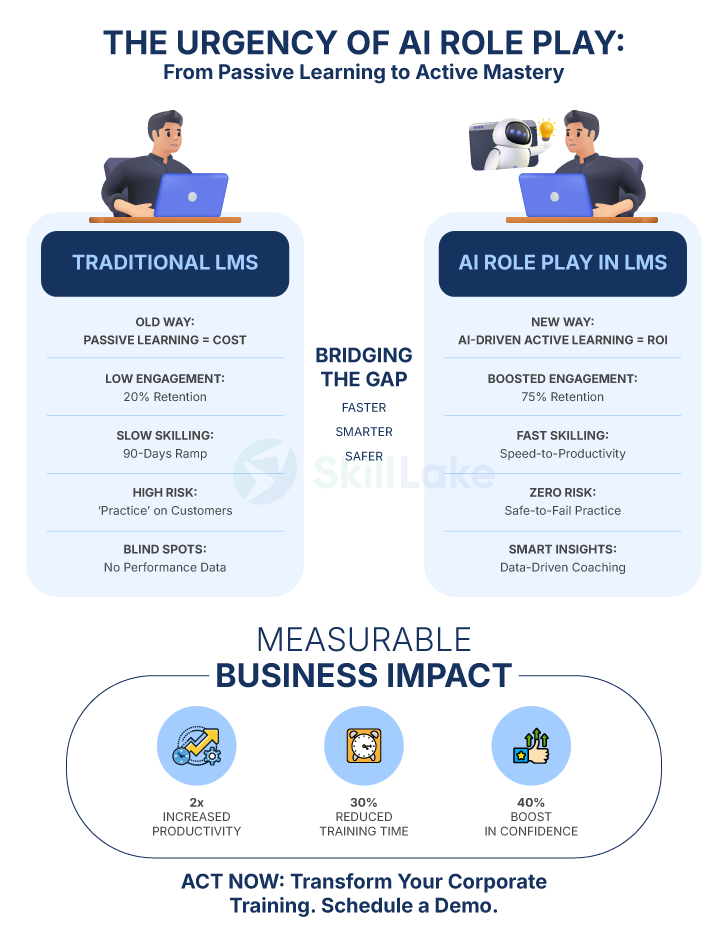
Traditional LMS platforms often hit a wall as they stick to a “one-size-fits-all” training approach. The inability of L&D managers to scale personalized coaching and provide one-on-one feedback to global teams disengages top talent, resulting in inconsistent performance and poor learning ROI.
Modern corporate training can no longer be a simple “checkbox” exercise where employees pass a quiz but fail to apply skills under pressure. Static content cannot simulate the actual stress of a high-stakes sales pitch or a difficult HR conversation, leaving talent unprepared.
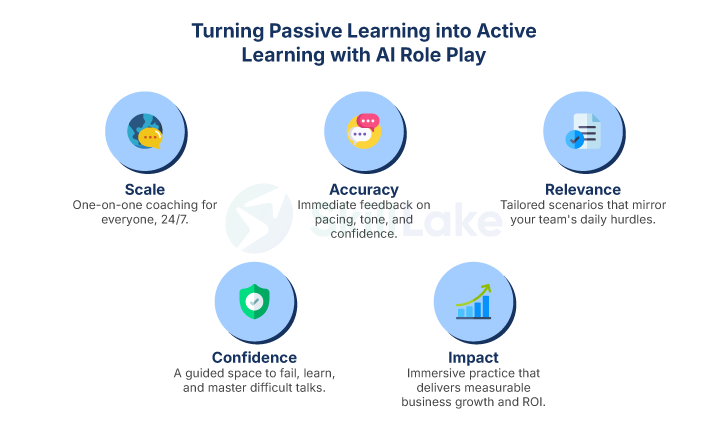
A corporate training LMS with AI role play solves this problem by delivering automated, personalized interactive simulations. Whether an employee is in New York or London, they can rehearse critical conversations and refine their soft skills without a human supervisor present 24/7.
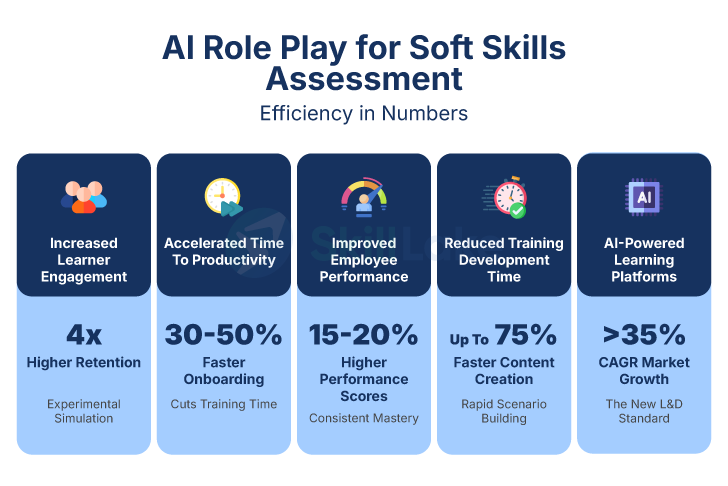
The results are evident: companies using AI for real-world scenario training see faster onboarding, better retention, higher ROI, and a future-ready workforce. In a competitive market, AI role play is the ultimate tool for measurable skill-building.
Key Features of the Best LMS with AI Role Play for Corporate Training
The non-negotiable feature of a corporate training platform is its ability to support experiential learning. Here’s what to look for:
- AI Role Play & Interactive Simulations
Dynamic AI personas and diverse scenarios for realistic, high-stakes practice with immediate feedback on tone and empathy.
- Employee Training Automation
Automate employee training using AI course builder and question generator to transform raw data into interactive modules and quizzes.
- Learning Personalization at Scale
AI-driven skill mapping and predictive recommendations to identify gaps and tailor learning paths to individual performance data.
- Advanced Admin & Integration Tools
SCORM and xAPI compliance, streamlined workflows, and seamless connectivity with existing HRIS, CRM, and communication ecosystems.
- Mobile-First Learning & Accessibility
Ensure training fits into a busy corporate schedule by providing offline capabilities and delivering micro-learning bites to employees whenever and wherever they work.
- Robust Performance Analytics
AI-driven performance analysis to measure skill-readiness, track certifications, and correlate training progress with actual business KPIs and real-world ROI.
Real-World Use Cases for AI Role Play in Corporate Training
AI role play transforms corporate learning by providing employees with a guided virtual environment to practice realistic workplace conversations. Here is how an LMS with AI role play drives practical skill development across modern organizations:
- Handling Sales Objections and Negotiations
Sales reps practice handling tough customer objections, pricing pushback, and competitor comparisons with dynamic AI personas. This helps them build the confidence and communication skills to close deals faster. - Difficult Workplace Conversations for Leaders
Managers rehearse difficult conversations—like giving negative performance reviews, settling team conflicts, or addressing behavioral issues—within a monitored, risk-free space before talking to actual team members. - Customer Service De-Escalation
Support agents learn how to calm frustrated customers, resolve complex billing disputes, and deliver empathetic answers. This helps improve resolution times and raise customer satisfaction scores. - Compliance and Risk Safety Training
Using AI role play training, teams practice responding to tricky security requests, ethical dilemmas, or policy breaches in real time. It equips employees to make safe, policy-compliant choices under pressure. - HR and Candidate Interviewing
HR teams and hiring managers can simulate structured job interviews, sensitive employee onboarding, and exit meetings using AI role play. This ensures fair, consistent, and professional interactions across the company.
Benefits of Using a Corporate LMS with AI Role Play
Implementing an AI role play training platform isn’t just a tech upgrade—it is a strategic pivot from tracking course completions to guaranteeing workforce performance.
- Bridging the “Knowing-Doing” Gap
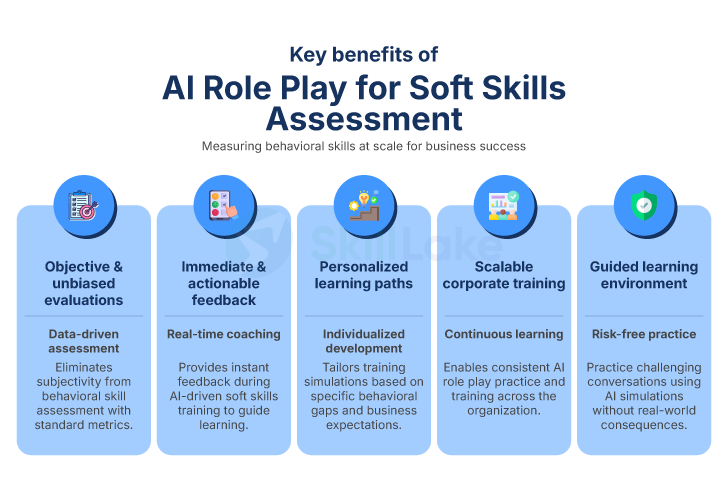
AI simulation training moves beyond theory, allowing employees to build muscle memory through realistic practice. This boosts the confidence and mastery required for handling high-stakes workplace interactions.
- Measurable ROI and Cost Reduction
Slash the massive overhead of human-led coaching and travel. AI role play provides high-impact, personalized training at a fraction of the cost, delivering clear, data-backed returns on every training dollar spent.
- Accelerated Speed-to-Productivity
AI simulation training condenses months of “on-the-job” experience into days. This allows your workforce to reach peak performance and productivity significantly faster than traditional methods.
- Scalable One-on-One Coaching
AI acts as a personal mentor for every employee, providing instant and objective feedback, along with adaptive guidance. Achieving this level of scalability in delivering personalized coaching is physically and financially impossible with human instructors.
- Safe Failure in High-Pressure Scenarios
A corporate LMS with AI role play lets your team make their first mistakes in a sandbox, not in front of a client. Safe failure allows employees to experiment, fail, and learn from errors without risking your company’s reputation or revenue.
- Unbiased, Data-Driven Assessments
Eliminate subjectivity in performance reviews. AI provides 100% consistent, data-driven feedback based on actual behavior, giving L&D leaders a precise, transparent map of workforce competencies and remaining skill gaps.
- Boosted Talent Retention through Mastery
Top talent stays when they see tangible growth. By providing cutting-edge tools that foster true professional mastery, you create a culture of excellence that increases employee engagement and long-term loyalty.
How to Choose the Best Corporate Training LMS with AI Role Play
Adopting the right AI-powered corporate training LMS is a strategic investment in your company’s future readiness. Here is a practical framework for identifying the best fit for your corporate goals:
- Prioritize Realistic Simulations
The best AI-powered LMS is not a basic, “glorified” chatbot. It should support dynamic, branching conversations and offer diverse personas that respond realistically to a learner’s tone and intent.
- Evaluate Content Automation
Look for an “AI Course Generator” that converts your standard manuals or instructions into custom into role-play scenarios in minutes. The right AI role play training platform saves your L&D team’s time.
- Assess Integration Needs
Ensure the LMS talks to your existing tech stack—HRIS, CRM, internal communication tool, and other business-critical applications. This allows learning to happen within the workflow, not in a separate silo.
- Look for Data-Driven Insights
Choose a platform that utilizes AI role play for soft skills assessment. This moves analytics beyond completion scores, highlighting specific skill gaps and correlating training to your bottom-line KPIs.
- Test for Scalability
Whether you have 500 or 5000 employees, the AI-powered LMS must provide consistent, instant feedback and on-the-spot guidance without significant lag or human intervention.
- Pilot Before You Invest
Watching a demo isn’t enough. Have your L&D lead or a bunch of actual learners run a real-world training scenario (a high-stakes simulation) to see if the AI’s feedback adds true value.
Related Reading: Why AI Role Play is the New Backbone of Corporate Training
Challenges in Corporate Training (and How an AI-Powered LMS Solves Them)
| Challenges in Corporate Training | The Ideal AI Solution |
|---|---|
| Significant & Rapid Employee Churn Most employees prefer to stay longer at companies that invest in their growth. Generic training feels like a lack of investment. | AI-Powered Personalized Learning Paths AI helps map individual career goals to business needs, making every employee feel like the company has a tailored plan for their success. |
| Inconsistencies in Global Training Delivering the same quality of training to diverse, geographically distributed teams is a logistical nightmare for many companies. | Multi-Lingual, Uniform Content Delivery AI-powered LMS platforms offer instant content localization and multilingual role play, ensuring every office meets the same high-performance standard. |
| The Instability of Core Skills In 2026 (and beyond), core professional skills are disrupting at record speeds, making traditional, slow-to-update manuals obsolete. | AI Course Generator for Content Automation Using an AI Course Builder, you can easily ingest new market data or SOPs and deploy updated training modules across your global workforce in real-time. |
| Low Engagement and Knowledge Retention Employees often consider mandatory sessions time-consuming and boring. This results in low retention and non-compliance. | AI Role Play Gamification Gamified AI role play turns passive video watching into active “playing.” This boosts learner participation and engagement. |
| High Costs of Training Failure Training new hires on live clients or expensive equipment is a massive financial and reputational risk. | Simulated, Guided Practice Environment Virtual AI simulation learning provides a supervised environment where mistakes cost nothing, but the lessons learned are immediately applicable to the bottom line. |
| Bias and Errors in Performance Reviews Human-led assessments are prone to mistakes and biases, making it difficult to objectively identify top performers or critical skill gaps. | AI Role Play for Soft Skills Assessment AI provides 100% objective, data-backed scoring on soft skills, giving leaders a transparent “capability dashboard” for the entire organization. |
Effective corporate training bridges the divide between having a job and mastering a role. Static and passive training results in active talent drain. Thanks to AI-driven corporate training platforms, now organizations can use the tech to transform these hurdles into competitive advantages.
The Next Step: Making the Strategic Move to an LMS with AI Role Play
Resting on static eLearning content is a business risk. In the coming years, leaders who pivot from “progress tracking” to “performance readiness” gain success in driving organizational agility. Transitioning to an LMS with AI role play is both a profitable investment and strong commitment to building a capable workforce that excels under pressure.
By implementing interactive AI role play simulations, you empower your team to master complex professional interactions, ensuring your company remains competitive, compliant, and consistently high-performing.
Why Choose Skill Lake LMS for Corporate Success?
Skill Lake is a premier corporate training LMS platform that combines generative AI with deep performance analytics. Our native AI role play, automated course generation, copilot, personalized learning paths, and other innovative eLearning features are designed for global scalability and mobile-first delivery.
Skill Lake eliminates administrative silos and directly correlates training to your business KPIs. Elevate your talent development and bridge the “knowing-doing” gap with a unified, intelligent corporate learning ecosystem.
Frequently Asked Questions
Q: What is an LMS with AI role play?
A: An AI role play LMS platform uses generative AI to create interactive, contextual simulations. This allows employees to practice real-world conversations and receive instant, objective feedback on their communication, tone, and empathy to improve their soft skills.
Q: How does AI simulation training specifically impact our bottom line (ROI)?
A: It increases speed-to-proficiency by up to 50%, moving employees from onboarding to revenue-generating activities faster. By automating personalized coaching at scale, it also redirects the focus of costly leadership hours toward strategic tasks instead of basic skill drills.
Q: Is an AI-powered LMS suitable for small teams?
A: Yes. Modern corporate training LMS like Skill Lake are highly scalable. Small teams benefit from automated course creation and instant feedback, which significantly reduces the administrative burden and costs of traditional training methods.
Q: Does my corporate data remain safe with an AI role play training LMS?
A: Yes. Leading AI LMS platforms like Skill Lake prioritize enterprise-grade security, using SOC2 compliance and private LLM instances. This ensures your sensitive training data and “institutional secrets” are never used to train public AI models.
Q: Is there any major technical “lift” required from our IT department?
A: Most AI-powered LMS platforms (like Skill Lake) are cloud-based (SaaS) and designed for “low-code” integration. They connect to existing HRIS and CRM systems via standard APIs, typically allowing for a full enterprise rollout in days rather than months.
Q: How does the AI assess soft skills accurately?
The AI analyzes learner responses based on specific parameters like sentiment, intent, tone, and keyword usage. It provides a data-driven, unbiased score that helps L&D leaders identify specific skill gaps across the entire workforce.

Other Reads from Skill Lake
-

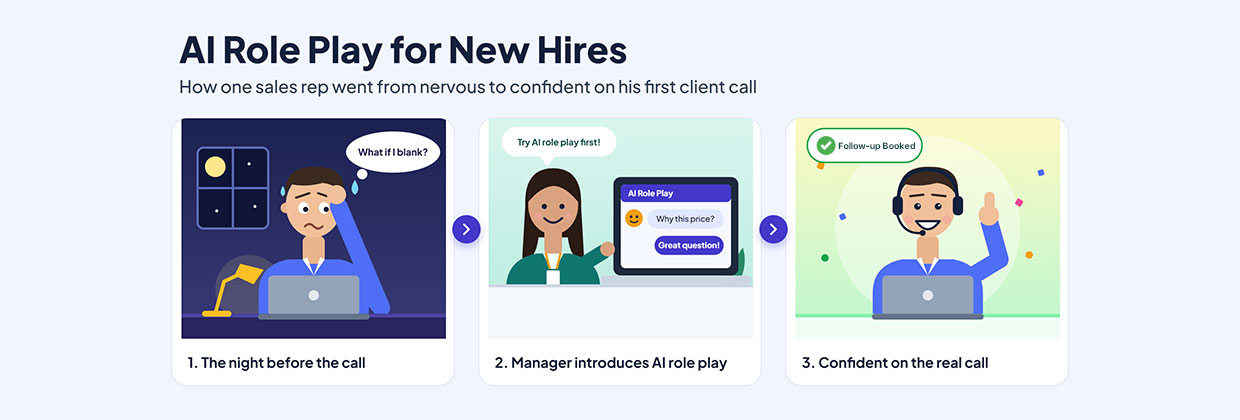
AI Role Play for New Hires: How One Sales Rep Went From Nervous to Confident on His First Client Call
Read MoreEvery new sales hire remembers the first client call. The product knowledge is there, the onboarding is done, and the calendar invite is sitting in the inbox. What is missing is the confidence that only comes from having done it before. Every new sales hire remembers the first client call. The product knowledge is there,
-
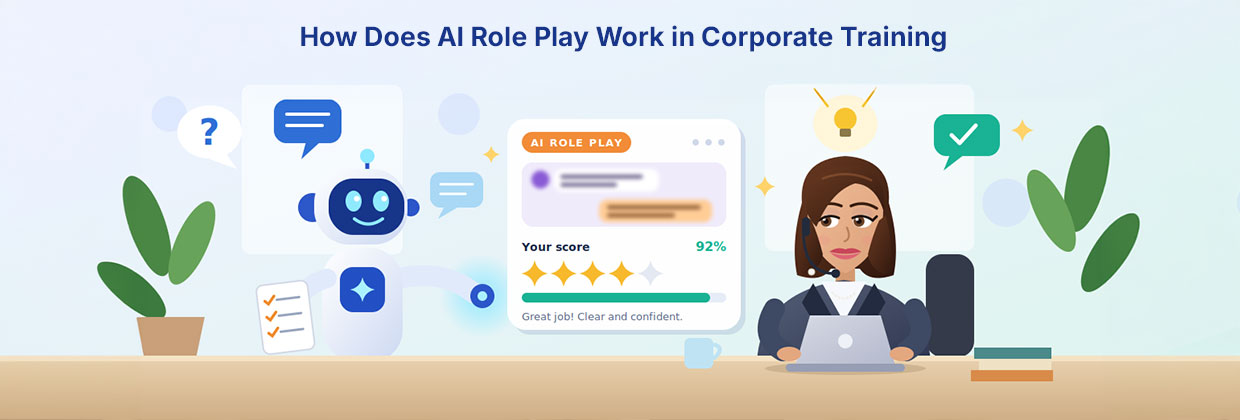
How Does AI Role Play Work in Corporate Training?
Read MoreAnyone can look up how to calm an angry customer. Ask a chatbot, skim a checklist, and you’ll have a decent answer in seconds. But the first time a real customer raises their voice, that checklist has a way of vanishing from your head. That gap between knowing and doing is where a lot of









Anoop Kumar MS
Anoop Kumar MS, Product Manager of Fingent Global Solutions Pvt. Ltd., is an experienced product specialist with expertise in identifying customer needs and delivering innovative, data-driven solutions. Skilled in wireframing, UX, requirements analysis, risk assessment, team management, and root cause analysis, he excels in managing product lifecycles and fostering seamless collaboration to address real-world challenges.